View Configuration
Each profile contains one or more views. A view applies its own search conditions on top of the profile global conditions using AND. Views are created as dynamic M-Files views in the Desktop client, scoped per user.
For delay search conditions on a view see Delay Search Conditions.
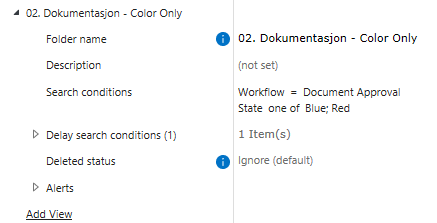
Option |
Values |
Default |
Description |
|---|---|---|---|
|
string |
— |
Display name used for the M-Files view and in the web client. Must be unique within the parent profile. Required. |
|
Markdown text |
— |
Optional description displayed in the Folder Stats web client. Supports Markdown formatting. |
|
M-Files search conditions |
— |
Conditions specific to this view. Combined (AND) with the parent profile global search conditions. Required. |
|
list of delay conditions |
(empty) |
Time-based alert conditions for this view. See Delay Search Conditions. |
|
|
|
Overrides the parent profile deleted status for this view only. |
|
alert criteria |
(not set) |
Count and date-based alert thresholds for this view. See Alert Criteria. |
Alert Criteria
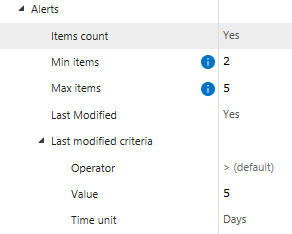
Alert criteria define when a view should be flagged as requiring attention. Alerts can fire based on the number of objects in the view (count-based), based on the last modification date of objects (date-based), or both conditions combined.
When an alert condition is met the view is marked in the Folder Stats web client dashboard so users can open it directly in M-Files.
Option |
Values |
Default |
Description |
|---|---|---|---|
|
|
|
Enables count-based alerting. When |
|
non-negative integer |
|
Visible when Items count is enabled. Alert fires when the view contains fewer items than this value. Set to |
|
non-negative integer |
(no limit) |
Visible when Items count is enabled. Alert fires when the view contains more items than this value. Set to |
|
|
|
Enables date-based alerting on the built-in Last Modified property. When |
|
delay criteria |
— |
Visible when Last Modified is enabled. Defines the time threshold applied to the Last Modified property. An alert fires when at least one item in the view satisfies the criteria. See Delay Search Conditions for operator and time unit options. |
Tip
Combine count and date criteria to cover both backlog volume and stale-item scenarios in a single view.
For example: alert when items exceed 10 (Max items = 10) AND when any item has not been modified
in more than 3 days (Last Modified > 3 Days).