Profile Configuration
Profiles are the primary configuration unit. Each profile defines a set of global search conditions and one or more views. Access can be restricted to specific M-Files user groups. Users who belong to at least one group of any configured profile gain access to that profile’s views in the M-Files Desktop client and the web client.
When no user groups are defined on a profile all authenticated vault users see it.
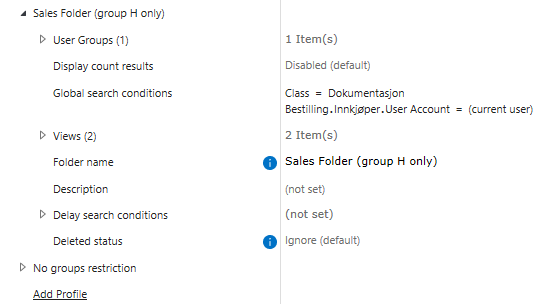
Option |
Values |
Default |
Description |
|---|---|---|---|
|
one or more M-Files user groups |
(empty — all users) |
Restricts this profile to members of the listed groups. When empty all authenticated vault users see the profile. |
|
|
|
Controls the count displayed in the profile title in the M-Files Desktop client. |
|
M-Files search conditions |
— |
Search conditions applied to every view within this profile. Each view’s own search conditions are combined with these using AND. |
|
string |
— |
Display name used for the M-Files folder and in the Folder Stats web client. Must be unique within the vault. Required. |
|
Markdown text |
— |
Optional description displayed in the Folder Stats web client. Supports Markdown formatting. |
|
list of delay conditions |
(empty) |
Time-based threshold conditions evaluated against the profile global search result. See Delay Search Conditions. |
|
|
|
Deleted-object filter applied to the global search. |
Delay Search Conditions
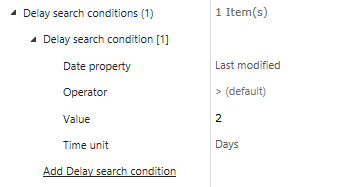
A delay search condition defines a time-based threshold on a date or timestamp property. When at least one item in the search result satisfies the condition an alert is triggered on the view.
Both profiles and views support delay search conditions. Conditions defined at the profile level are evaluated against the profile global search result. Conditions at the view level are evaluated against that view’s specific result set. See View Configuration for view-level delay conditions.
Option |
Values |
Default |
Description |
|---|---|---|---|
|
date or timestamp property definition |
— |
The vault property whose value is compared against the threshold. Only date and timestamp property types are listed. |
|
|
|
Comparison operator applied between the property date and the computed threshold date. |
|
positive integer |
— |
Numeric magnitude of the time threshold. |
|
|
— |
Unit applied to Value when computing the threshold date relative to the current date and time. |
Tip
Use operator > with value 5 and time unit Days on a Last Modified property to alert
when items have not been updated in more than five days.