VAF Configuration
In M-Files Admin go to Configuration, select Other Applications. Folder Stats is listed in the applications pane.
Open configuration from the right pane tabs or by expanding the application tree in the left pane.
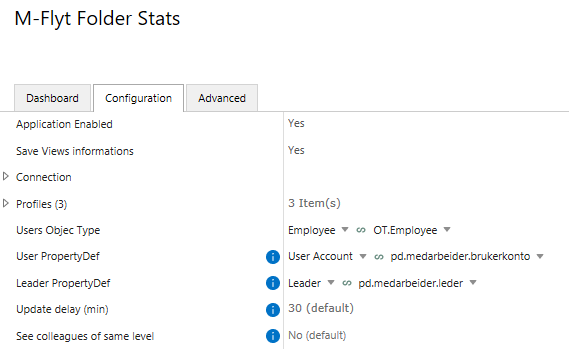
Option |
Values |
Default |
Description |
|---|---|---|---|
|
|
|
Disabled by default. Must be set to |
|
|
|
Activates the Connection section and enables periodic saving of view data to SQL Server. When |
|
M-Files object type |
— |
The vault object type representing users (e.g. Employee). Used to resolve user accounts and build the leader hierarchy. Required. |
|
Lookup property definition |
— |
A Lookup property on the Users Object Type that references the built-in M-Files Users value list. Maps vault objects to M-Files user accounts. Required. |
|
Lookup property definition |
— |
A Lookup property on the Users Object Type that identifies the direct leader of each user. Required for colleague and employee visibility. When not set colleague and employee features are disabled. |
|
number (5–120) |
|
How often in minutes the M-Files Desktop client refreshes dynamic views for the current user. |
|
|
|
When enabled users can see the views of colleagues who share the same direct leader. |
|
|
|
Only visible when See colleagues of same level is enabled. When enabled users also see the subordinates of each visible colleague. |