Connection Configuration
Warning
The Connection Settings section and all database persistence features are only active when the Folder Stats
license includes the Save2DB module. If the module is not included the section remains hidden and no data
is written to the database, even when Save Views informations is set to true.
The Connection section is visible only when Save Views informations is true.
It defines the SQL Server target and the schedule on which view data is saved to the database.
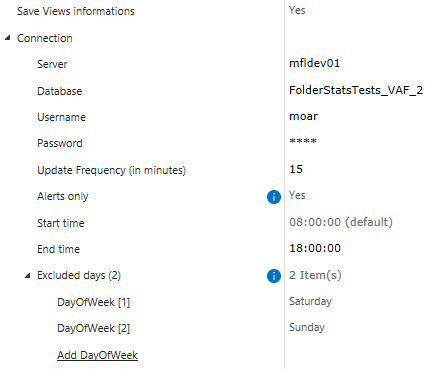
Option |
Values |
Default |
Description |
|---|---|---|---|
|
server name or IP address |
— |
Hostname or IP address of the SQL Server instance. Required. |
|
database name |
— |
Name of the Folder Stats SQL Server database. Required. |
|
string |
— |
SQL Server login username. Required. |
|
string (masked) |
— |
SQL Server login password. Required. |
|
number (15–120) |
|
Interval in minutes between each database save cycle. |
|
|
|
When |
|
HH:mm:ss |
|
Earliest time of day the save task may start. Tasks scheduled before this time are deferred until the start of the window. |
|
HH:mm:ss |
|
Latest time of day the save task may start. Tasks that would begin after this time are deferred to the next day’s start time. |
|
List of days of the week ( |
(empty) |
Days on which the save task is suppressed entirely. Commonly set to |
Tip
Enable Alerts only when the web client is used solely to surface views that require attention.
This reduces write volume and keeps the database focused on actionable data.